

Impact*
• Improved usability
• Increased satisfaction
• Fewer cancellations
Timeline
~4-month design+dev
2025
Key Learning
Recognizing value in conventional mental models
I worked on an edtech platform for students to learn math through video lessons and dynamic practice. The product struggled to keep users engaged through to the actual learning experience. Learners didn’t understand how to manage their courses and well-intentioned personalization efforts were creating barriers.
Introduction
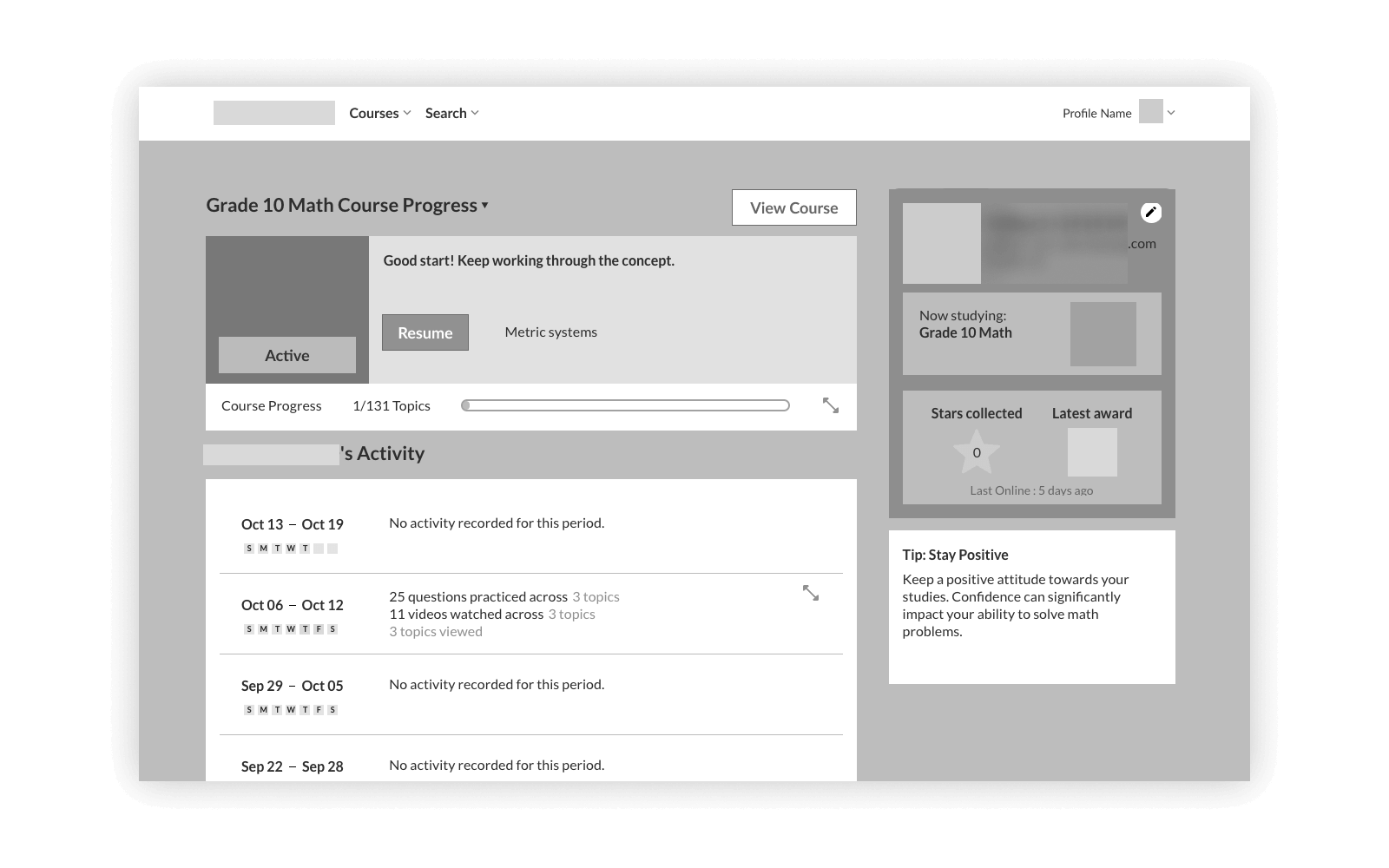
Two major things affected the dashboard: (1) users were dropping off before diving into the learning content, and (2) customers reported confusion with course management, validated by session recordings. When leadership was exploring adjacent offerings beyond the initial subjects, I took the opportunity to solve these problems as well as redesign it for extensibility.
My Role
As the solo product/UX designer, I owned the entire design process, under the guidance of my PM: researching competitors, gathering requirements, wireframing, creating mockups, reviewing with stakeholders, and QA-ing the development. Working with a small team without peer designers was challenging, but thankfully dashboards tend to be driven by convention. I had to be disciplined about following established patterns that avoid unnecessary complexity, ensuring a design that wouldn’t require a “phase two” to fix usability issues.
The Problem
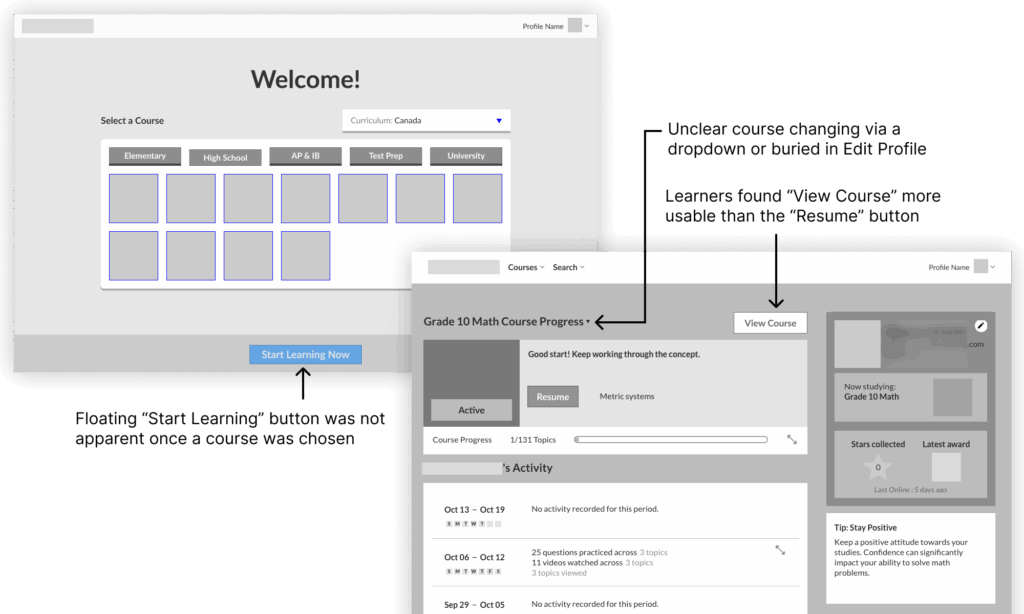
Initially, stakeholders pointed to the welcome screen and onboarding flow as the culprit. Data showed many users were leaving early in the experience; session recordings and user feedback helped uncover two core issues.
Business/UX issue:
Users were leaving early in the experience
→
Cause: onboarding friction
Users had to complete profile setup before they could access any learning content.
Business expansion:
Expanding beyond math courses
→
Opportunity to fix: Non-standard course management
Learners couldn’t figure out how to switch between grade levels or manage multiple courses.
Understanding Learners and Competitors
I had to be strategic about research. I focused on three methods: user feedback, session recordings and analytics, and competitive analysis.
- User feedback: Backed up by session recordings, increasing my confidence in proposed changes
- Session recordings and analytics: Identify confused clicking in welcome and dashboard screens, plus pageview drop-offs from signup to lessons
- Competitive analysis: Focus on how they manage courses, how they expose their features and without overwhelm
The New Dashboard Experience
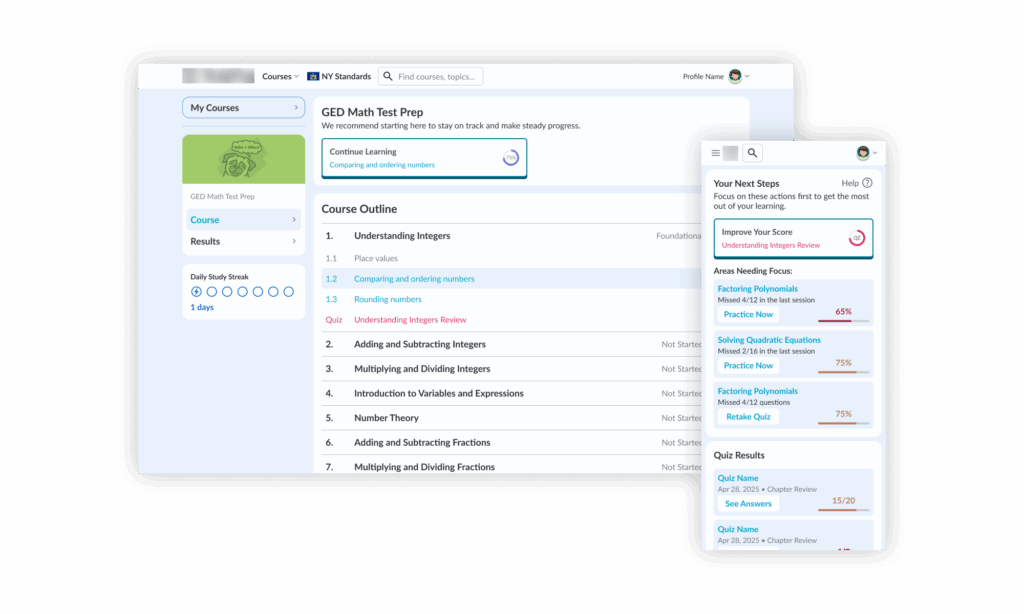
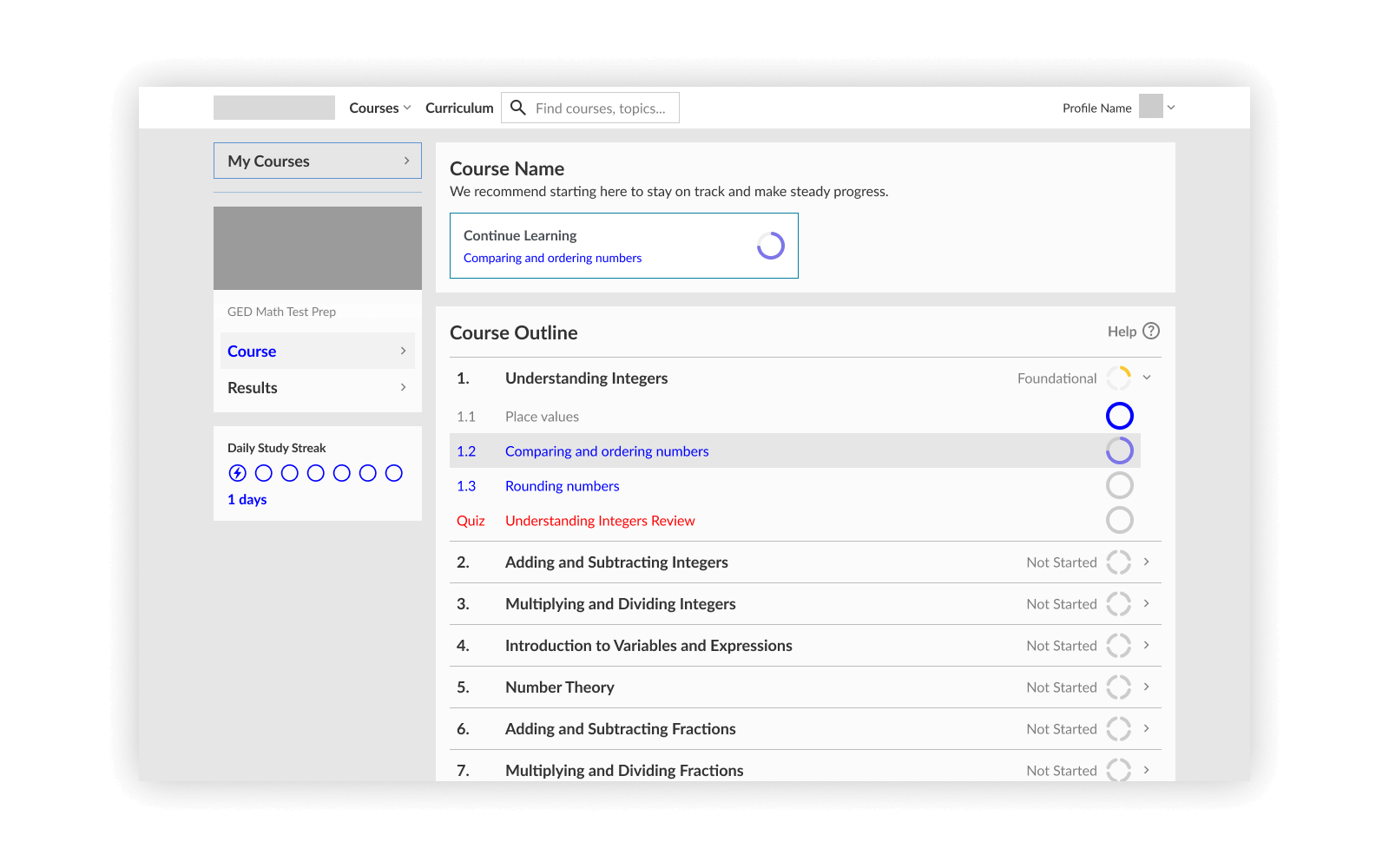
The redesigned dashboard centres on one principle: get learners learning as quickly as possible. Every decision was made to reduce friction between signing in and starting a lesson, so that learners can check out if the content is right for them.
Remove onboarding friction
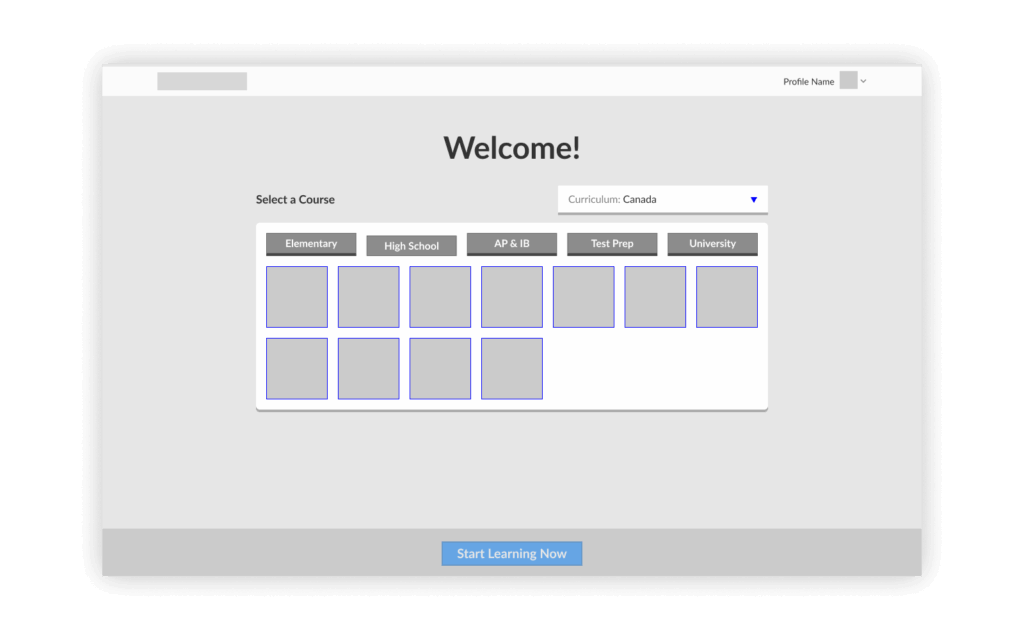
Before they start learning, we only ask what course they’re focusing on. The “Add a Course” button is prominently displayed, teaching learners they can add more courses later, reducing confusion about course management.
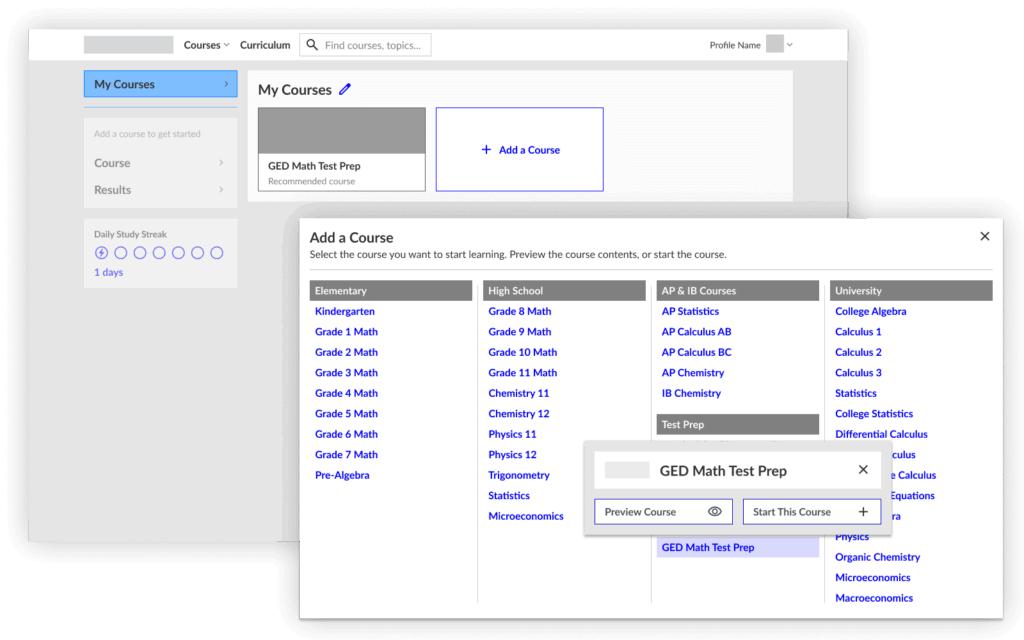
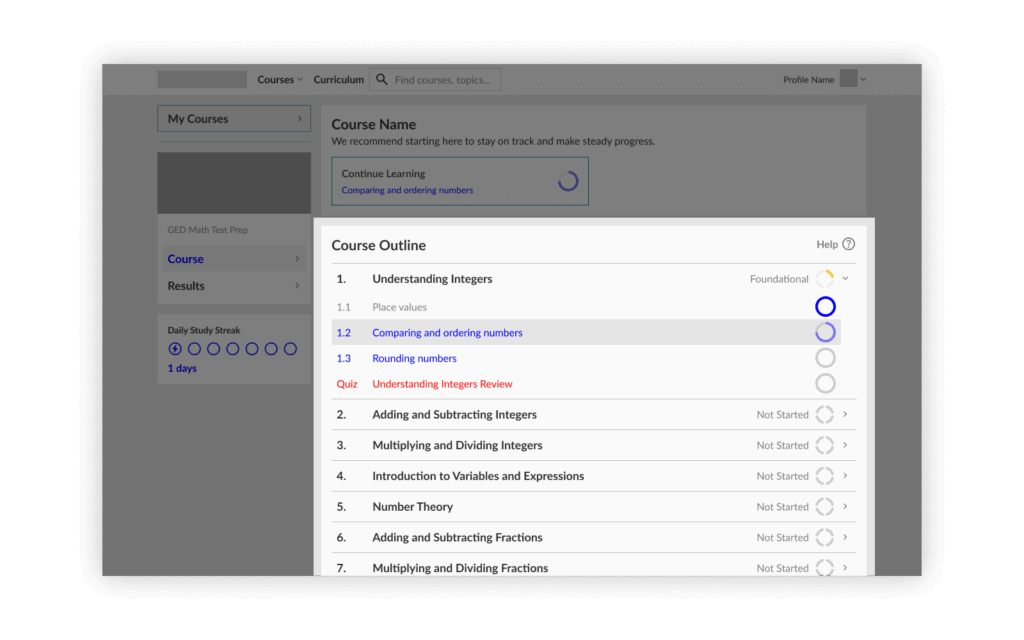
Navigation and Extensibility: I incorporated a sidebar pattern that could accommodate more features without needing too much design work. If we wanted more integration, we could feature it in the “recommended” section at the top of each screen as a start. This pattern could now be replicated for other learning tools over time, without requiring major redesign.
Reduce Time-to-Learn
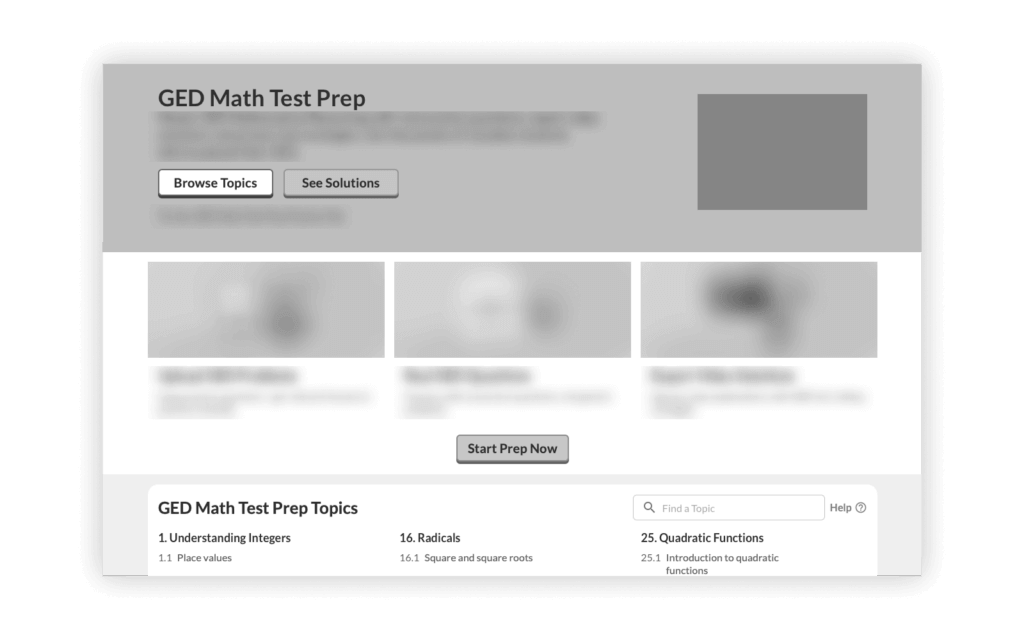
By showing the topic list right away, it makes it easy to follow the course content. If they wanted to find a specific topic, they could use search.
Impact & Results
The redesign launched in mid 2025. I introduced a feedback tool which helped us catch issues quickly post-launch, and provided tangible data to work with. The early results started to validate our research-driven, convention-focused approach. With a little help from AI to interpret the data, I found:
Usability
Ease of finding content substantially improved*
User Satisfaction
Customer satisfaction scores increased from a low baseline*
Time to Learn
Learners reached their first lesson faster, greatly reducing cancellations†
Challenges & Solutions
Design Considerations
Related areas of the product showed similar issues with usability according to user feedback, and were candidates for future iteration. It would have been our next step, while also considering that this area’s needs have another layer of complexity.
There’s some mixing of mental models between the Course dropdown in the header and My Courses in the sidebar. Once broader navigation updates are implemented, this will need to be addressed.
One of the biggest challenges was avoiding the “we’ll fix it in phase two” trap. Previous dashboard iterations had shipped with known issues under the assumption they’d be quickly resolved, but resource constraints meant those issues lingered for months. The team will see if this new version holds up.
Navigating Ambiguity
Working at a small company meant dealing with shifting priorities and limited resources – limited tracking and user testing resources for the learner’s core experience; a requirement to be feasible and intuitive to use, quickly. I leaned more heavily on competitors’ established patterns and pushed for feedback tools to catch problems quickly.
Outcome
Despite these challenges, the launch went smoothly because:
- I learned from past iterations: I studied what failed in previous dashboard designs and made sure not to repeat those mistakes
- I stayed disciplined about conventions: When in doubt, I chose the pattern that users would already understand
- I prioritized the right things: Getting users learning quickly was always the north star
This project taught me that I don’t always need to pursue innovative design. Users come to learning platforms with expectations shaped by other platforms they’ve used. Trying new things risks creating more confusion. Sometimes the best design is the most conventional one.
I spent several weeks on competitive analysis, but in retrospect, I should have documented a more formal heuristic analysis of the existing interface. That would have given me even more confidence in my design decisions and made it easier to communicate problems to stakeholders.
That said, imperfect research was better than no research. The competitive analysis gave me a framework and vocabulary for discussing design decisions. The session recordings gave me empathy for users’ pain points.
Looking forward, I believe the product can now support more learning tools and more diverse offerings. More than just fixing usability issues, the platform is more able to grow with the business.
Team
Solo designer in a team of 1 PM, 1 web dev, and founder
Tools
Figma, analytics tools, feedback tools, AI assistants
Skills
End-to-end product / UX design, research, QA, with AI assistance
*Early results. Baseline comparison uses parent dashboard feedback as a proxy for the previous student experience, as student feedback was not yet implemented.
†Analytics tools: Approximately from the same time the year previous. Seasonality and macroeconomic conditions may have had an effect.